I bought two servos Dynamixel, the AX-12A, which are the basic servos version of the Korean company Robotis inc.
Dynamixel servomotors are like Ferrari in the world of the cars : the best servomotors on the market.
Some characteristics of these servos:
- Operational Torque: 144 oz-in (10.4 kg.cm)
- 1 / 2 duplex multi-drop serial bus
- 1M bps serial communication
- Reports position, speed, load, voltage, and temperature
- Full rotation mode
- 300 ° angular position in 1024 increments
- Speed and torque control in 1024 increments
- Built in LED status indicator / alarm
- Shutdown on max / min voltage, load or temperature
- Single cable network connection
They are not particularly expensive: about $ 45 U.S., in Europe about 45-50 euros.

These servomotors have difficulty connecting to the Arduino. In fact, the half-duplex communication to 1Mbps requires additional circuitry to make connections to Arduino if there are several servos to be connected. A single servo can be connected directly to the Arduino, in the case of several actuators it is necessary to use a tri-state buffer, which is placed between the Arduino and AX-12A. A simple tri-state buffer is the 74LS241N.
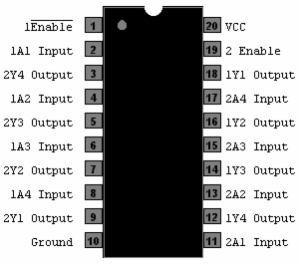
74LS241
The Dynamixel protocol is a serial protocol, so, Arduino side, the buffer 74LS241 must be connected to the serial port and then on pins 0 and 1. This is a problem: if the serial port is used byDynamixel, how to display information through the Arduino IDE Serial monitor?
We need another serial port. The Arduino library NewSoftSerial can help us, but we also need a USB-serial converter. I chose the converter USB2Serial built from Arduino team.
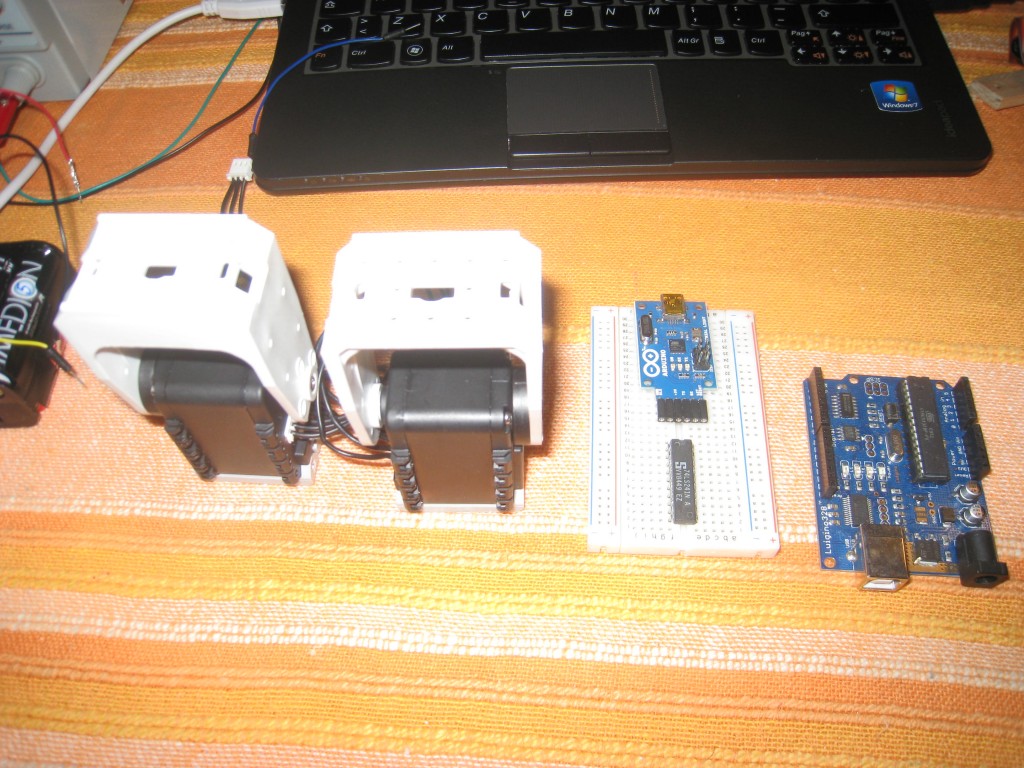
This is a picture of all the components needed to use the Dynamixel Servos.
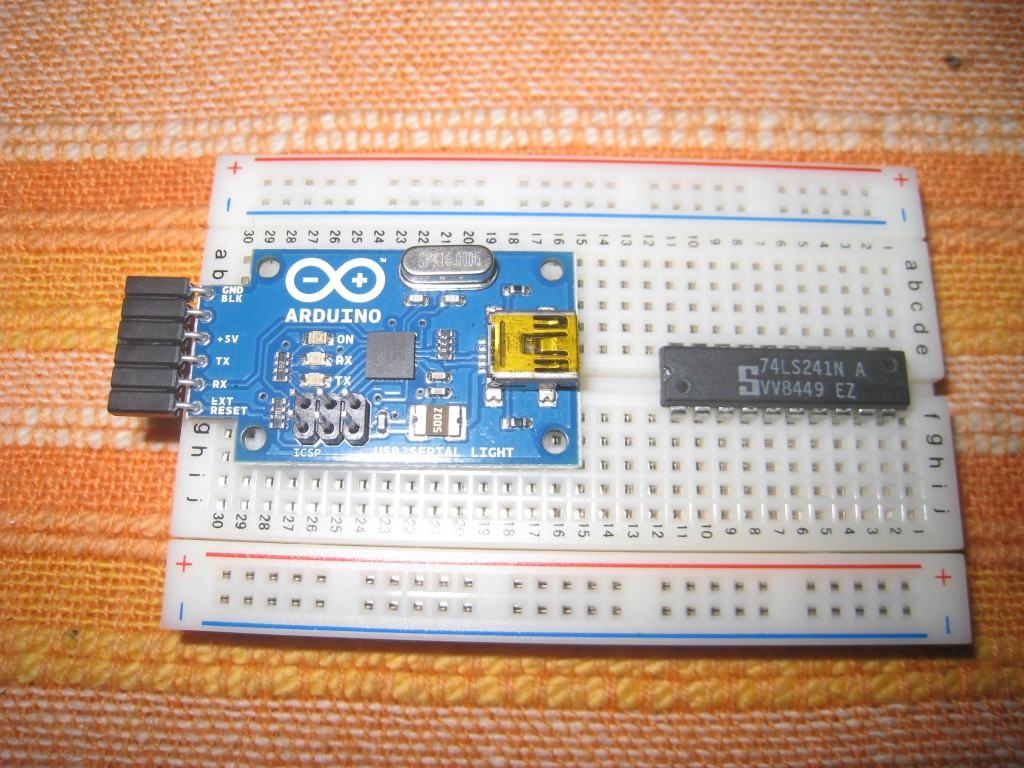
The 2 ‘strange’ components: the 74LS241 and the USB2Serial converter:
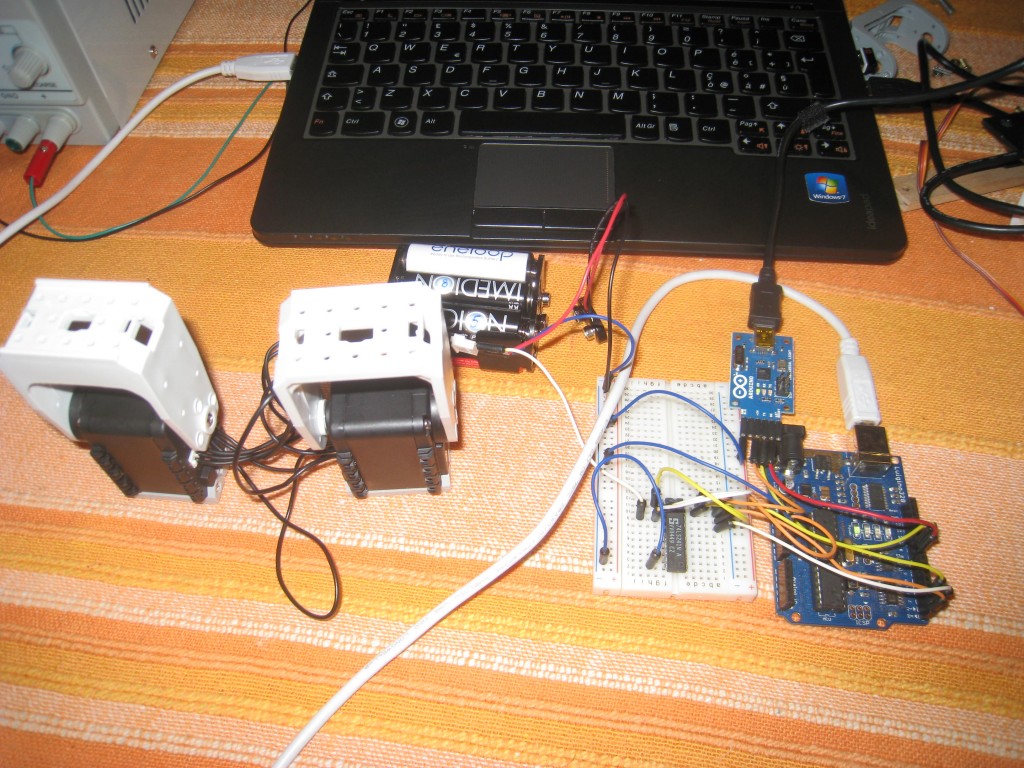
These are all the components wired:
This is the wiring schema (sorry for the manual drawing):
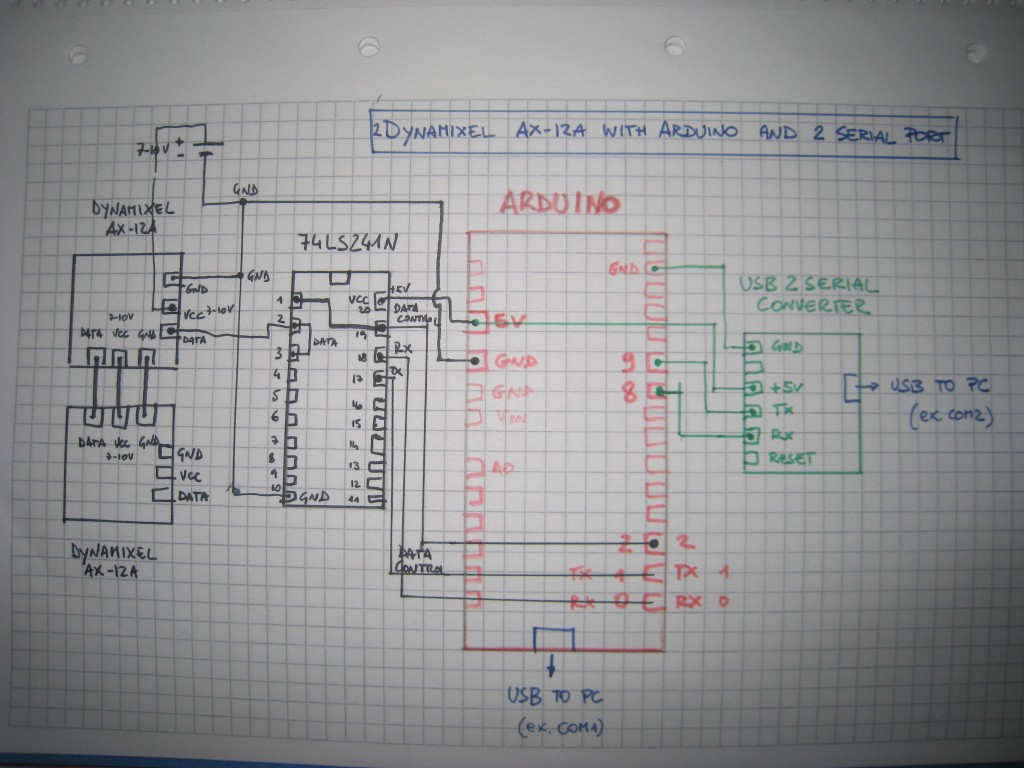
Dynamixel servos require a software library to work with Arduino. An awesome library, realized by Savage Electronics, can be found here. Instructions can be found here.
This is a short video showing the Dynamixel servos in action. It is possible also to see the values printed in the Serial monitor with the NewSoftSerial throw the Serial port between the pins 8 and 9.
This is the code used:
#include <Dynamixel_Serial.h>
#include <NewSoftSerial.h>

NewSoftSerial mySerial(9,8); //9=tx, 8=rx
int k=0;

void setup(){ // Configuration

Ax12.begin(1000000,2); //2=data control
mySerial.begin(9600);  //speed of serial port used by NewSoftSerial
}

void loop(){

// move servo 1 and 2 randomly
Ax12.move(1,random(200,600));
Ax12.move(2,random(200,600));
mySerial.print("Number:");
mySerial.println(k++);

delay(1000);

mySerial.print("Number2:");
mySerial.println(random(100));

}
#1 by Hazel on 4 September 2018 - 07:54
Quote
error to compile
C:\Users\Owner\Documents\Arduino\libraries\NewSoftSerial-master\NewSoftSerial.cpp:39:24: fatal error: WConstants.h: No such file or directory
#include “WConstants.h”
have solution for this problem ?
please email me back if u know!
thanks!
[email protected]
#2 by Hazel on 19 July 2018 - 11:09
Quote
what the use of usb2serial, and how to use it.
and the library + coding
can u teach me, and email me
my email : [email protected]
#3 by Chris Choi on 8 June 2018 - 15:03
Quote
Hello, I am new with the usb2serial gig. and the NewSoftSerial Library also got replaced by SoftwareSerial in Arduino. So I am completely lost. Can a get an up to date version of the solution to my email?
[email protected]
Thanks
#4 by mahrad-puryusef on 18 November 2017 - 12:38
Quote
I bought ax18a and because of the similarity of using the ax12a data, I’m working now. It’s just that the problem is not going to the point and I’m not going to use the movespeed (id, position, speed
)
I used speed control but I did not use the dynamixel library. I did not reply. I did not have a buffer. I connected directly. Help me please . The next two days is the delivery time of the project
[email protected]
#5 by robottini on 18 November 2017 - 12:43
Quote
Hi, sorry but if you have some doubts about the library, you can go here: http://austinlpalmer.com/Projects/Documentr/#/home
I didn’t write the library, so I can’t help you.
#6 by mahrad-puryusef on 18 November 2017 - 12:35
Quote
hi
I bought ax18a and because of the similarity of using the ax12a data, I’m working now. It’s just that the problem is not going to the point and I’m not going to use the movespeed (id, position, speed
)
I used speed control but I did not use the dynamixel library. I did not reply. I did not have a buffer. I connected directly. Help me please . The next two days is the delivery time of the project…
#7 by mahrad on 18 November 2017 - 12:33
Quote
hi
I bought ax18a and because of the similarity of using the ax12a data, I’m working now. It’s just that the problem is not going to the point and I’m not going to use the movespeed (id, position, speed
)
I used speed control but I did not use the dynamixel library. I did not reply. I did not have a buffer. I connected directly. Help me please . The next two days is the delivery time of the project
#8 by Amin Mirfakhar on 26 October 2017 - 07:42
Quote
Hi
Is it possible to set the ID for Dynamixels Ax by arduino ?
#9 by robottini on 26 October 2017 - 08:00
Quote
Yes, you can. This is the command: http://austinlpalmer.com/Projects/Documentr/#/setid
#10 by Anush on 27 September 2017 - 06:48
Quote
Trying to download the libraries to run the code but the download link is down. Could anyone email me a zipped version of the libraries? Email : [email protected]
#11 by sai on 23 July 2017 - 20:26
Quote
Can i able to control ax-18a dynamixel servos with these libraries
#12 by Faris Ali on 9 April 2017 - 09:15
Quote
Hello Everyone!
On savage electronics=Earlier versions of these libraries can be downloaded from here. phrase cannot be reachable .. and I can’t control my dynamixel with this new library.. so kindly can anyone can send me the oldversion of AX 12a library.
[email protected]
#13 by Faris Ali on 7 April 2017 - 16:21
Quote
Dear User,
I am working on my final year project to make a scara robot by using dynamixel ax 12a, arduino uno and 74ls241n.
Can you send me the old library …
Anxiously waitçing for your reply…
[email protected]
#14 by resistors on 20 February 2017 - 05:09
Quote
Valuable info. Fortunate me I found your website by chance, and I am shocked why this accident did not happened earlier!
I bookmarked it.
#15 by Shine on 14 December 2016 - 13:57
Quote
I have Arduino Mega, Ax-12 A and able to rotate it easily at any speed but dont know how to set angles 90 degree, 90 degree,and 90 degree again.can you help me with this.
#16 by soumya on 19 September 2016 - 13:29
Quote
hii ,
i followed your instruction but my ax12a servo is not working can you give me the library file of ax12a and one example program. Because i downloaded the above library you told it showing a lot of error .
Thanks
please reply @[email protected]
#17 by nuclear_raccoon on 19 April 2016 - 23:24
Quote
Sir,
I followed evrything you said but none of the serevos are responding, the led on the first servo is blinking and the second(daisy chain linked) stays on. Can you instruct me on how to get the servos working?
Thank you.
pls reply @ [email protected]
Also can you tell what me the torque enable command is?
#18 by nuclear_raccoon on 19 April 2016 - 23:23
Quote
Sir,
I followed evrything you said but none of the serevos are responding, the led on the first servo is blinking and the second(daisy chain linked) stays on. Can you instruct me on how to get the servos working?
Thank you.
pls reply @ [email protected]
#19 by Senoaji on 8 March 2016 - 08:42
Quote
Hi, I followed the guide that you posted, and everything works very well 😀
Just one question, Arduino has several serial ports not only 0 & 1
in Arduino Mega serial ports can be used from 14 to 19, is it possible to use 2 of those ports to display information on the serial monitor?
#20 by Akachai on 6 November 2015 - 12:28
Quote
give me Project file
I cannot run the project
the project cannot find library
please sent project file to me at [email protected]
#21 by Akachai on 6 November 2015 - 12:27
Quote
give me Project file
I cannot run the project
the project cannot find library
#22 by pap on 3 November 2015 - 15:32
Quote
Hello, im a student and i have a project to do, i have an arduino mega 2560 and AX-18A servos, i would like to know if i still need the NewSoftSerial usb converter and if i need different libraries.Damn im so anxius about the project. Thenx for your time.
I will be glad if you could reply me with an email, mine is [email protected]
#23 by mny on 22 February 2015 - 11:07
Quote
is it necessary to use data control? or what is the reason for using data control
#24 by achmadfc on 3 February 2015 - 08:56
Quote
has been changed sir,
– cable is connected
– id same in the program
– i make arduino uno for controlling
– try 2 servo comunication . it’s ok
– try 3 not responding, but if me unplug 1 cable of servo the 2 servo ready and working,.
send me mail : [email protected]
thankyou ^_^
#25 by achmadfc on 30 January 2015 - 08:43
Quote
hi sir, i try to control 2 servo from arduino is succesfully, but i failed to try 3 comunication servo.
i testing servo one by one, it’s so okey,.
what its wrong?
help me sir
thankyou,
#26 by robottini on 30 January 2015 - 18:09
Quote
Did you change the ID, otherwise the 3 servo have the same ID? I used 6 servos without problems.
#27 by fred on 7 December 2014 - 19:47
Quote
i want to connect servo to pic ,i can’t find any libarary for it can you guid me?
#28 by fabio on 3 December 2014 - 16:30
Quote
Hola a todos,
yo estoy programmando dynamixel Ax-12 y ax -s1 con arduino one y no se como hacer para utilizar los valores del sensor infrared para terminar un movimiento y hacer un otra cosa…por ejemplo cuando el valor esta a 20cm el Ax-s12 termina el movimento y volver en otra posicion…alguen puede ajudarme?
gracias a todos
#29 by Merissa on 23 October 2014 - 04:41
Quote
Where are the libraries for the AX-12A? I have been looking and nothing is working for the servos.
Thanks!
#30 by robottini on 23 October 2014 - 08:54
Quote
here: http://savageelectronics.blogspot.it/2011/08/actualizacion-biblioteca-dynamixel.html
#31 by fabio on 22 October 2014 - 12:51
Quote
hi all,
i have a problem for a connection my Dynamixel AX-S1(ID100) with Arduino for a Color recognition through the 3 sensors on my Dynamixel…
when i look the manual?help meeeee
see you
#32 by TUKUR on 20 September 2014 - 09:19
Quote
pls is there any difference interms of library or code between dynamixel AX-12 AND AX-18A in relation to arduino
tq
#33 by alexis on 9 August 2014 - 07:00
Quote
Alguien se dio cuenta que no responde el servo a las funciones de lectura.
Alguien pudo resolverlo, les agradezco su ayuda.
ANDRES :Trata de usar el Dynamixel wizard para ver primer el ID que tienen tus servos, luego el baud rate.
#34 by ANDRES on 24 May 2014 - 20:41
Quote
Quiero conectar 4 servos ax12, pero no funcionan, trate con solo 2, pero solo se mueve uno, es como que la trama de datos se pierde pra el 1, cambie los ID, q puedo hacer
#35 by Zilong on 22 March 2014 - 03:25
Quote
Hi, Thanks for your posting!
I bought a robot arm which is built up with 5 AX-12A motors.One problem:with a load,by writing a value to the Goal Position of the Control Table,the motor will stop above or below the goal position depended on the trajectory with a steady state error which depends on the load,do you have any idea to eliminate the error with presence of a load?
#36 by Michael on 3 March 2014 - 09:23
Quote
Hi there, This looks like a much cheaper way of controlling dynamixel than using their own hardware! I’m planning on using 3 ax-12a’s for my honours thesis in Mechatronics, the topic is visual servoing, and so the response time of the commands needs to be very quick, and the movement needs to be very accurate. Does the 0.29degrees of accuracy get affected? seems like it shouldnt…
also, did you need to do any programming of the dynamixels before using them? I really dont want to have to buy their usb2dynamixel converter :/
Thanks so much!
#37 by robottini on 3 March 2014 - 10:00
Quote
Hi Michael, I think you can consider the stepper motors. They are chep, very accurate and strong. With a 1/32 microstepping you can obtain a resolution of 0.06 degrees with 20 euros.
If you prefer to use the Dynamixels, the don’t need any programming before using them.
#38 by Chris on 20 February 2014 - 21:00
Quote
Ok,
i buy them for a project at university. There is enough money for such servos. =)
The AX also has a TTL protocol as you can see here.
http://www.generationrobots.com/de/401078-servomotor-dynamixel-mx-106r-robotis.html#caracteristiques
Thank you for your reply.
I think a lot of questions will appear when starting the project. Can you give me some tipps, to connect the Dynamixel with a Arduino.
I read a lot, that the biggest problem is the programming of the servos, because of the library.
Why did you use exactly the 74LS241N? I am new in programming servos, sorry for this question. =(
#39 by Chris on 19 February 2014 - 17:27
Quote
Hello,
do you think that it is also possible to connect a AX12 with the arduino, using this 74LS241N and additonally connect a MX64 and a MX106 to the AX12 and control it with the serial port of the arduino??
Thank u.
Can someone help me and write me an email, [email protected]
Thank you.
#40 by robottini on 19 February 2014 - 18:09
Quote
I think it is possible, but I never tried. The MX series are too much expensive for me.
The main differences are:
AX12 – com speed 1 Mbps
MX64/106 – com speed 3 Mbps
Ax12 – Protocol RS-485
MX64/106 – Protocol RS-485/TTL
So you have to set the MX64/106 com speed to 1 Mbps and Set the protocol to RS-485. After I think everything can work, but i’m not sure.
#41 by Lokesh on 23 January 2014 - 16:19
Quote
Thank you very much for your reply.. No, i have not used it. According to your explanation, I thought there is no need of 74LS241N for driving single motor. I’m a student, I have many doubts. I need your help, if you dont mind please send me a mail to ‘[email protected]’. Hoping for your reply..
#42 by robottini on 23 January 2014 - 13:05
Quote
Hi Lokesh, are you using the tri-state buffer 74LS241N ?
If you connect the AX-12 with the Arduino without the tri-state buffer, it doesn’t work.
#43 by Lokesh on 23 January 2014 - 12:57
Quote
Hello, as u said i’m trying to interface the single AX-12a directly to the arduino(atmega328) board. I’m connecting the arduino board to the laptop via USB cable. I have given 9.6V external supply to the AX-12a. I have tied RX and TX pin (that is pin 0 and 1)and connected it data pin of AX-12a. I have downloaded all the requirements which you have described above. Still I’m not able to move the motor. Please guide me
#44 by Cho934 on 31 December 2013 - 13:38
Quote
Why don’t you use the pull up resistor (10k) between DATA (from AX12) and VCC (5v) ?
#45 by robottini on 1 January 2014 - 17:59
Quote
You can try to add the pull-up resistor. But without the resistor it works very well.
#46 by Kang Kamal on 12 November 2013 - 05:38
Quote
can i replace 74LS241N with 74HC595… and will work?? and if with > 12 Dynamixel, it’s performance slowly..?? thanks,.
sorry bad english
#47 by robottini on 12 November 2013 - 10:28
Quote
Yes, I think you can replace the 74LS241N with the 74HC595. Try!
#48 by James koh on 5 November 2013 - 22:44
Quote
Can I get Dynamixel_Serial.h library
I bought all of modules
but I can`t test because I don`t have a that library
#49 by Caleb Kang on 27 May 2013 - 10:14
Quote
Hi Robttini
Thanks for putting this tutorial up it’s really helpful for someone who is a novice like me. I have a question. How would I add another series of ax12 servos to this circuitry? Would I add another 74LS241N to data controller 3 on the arduino or add the 2nd series of servos to the existing 74LS241N?
Thanks for your help!
#50 by robottini on 27 May 2013 - 10:30
Quote
You can wire up to 255 servos to the existing 74LS241N
#51 by Leo on 8 April 2013 - 09:42
Quote
hi, i am using arduino ax-12 for my project too.
but i have problem reset the motor ID. I use the Buadrate_and_ID_setup lib code and change the SERVO_ID to the desired ID, but it doesnot works. Is there any other parts that i need to change too?
#52 by robottini on 9 April 2013 - 11:17
Quote
This are the only commands you have to use. I don’t know why they don’t work for you. I think that Josué, the guy of http://savageelectronics.blogspot.it/ can help you
#53 by Nanda on 7 April 2013 - 21:46
Quote
I’m trying to run just one MX-64 Dynamixel to the Arduino. How do I modify the code to register that? In addition, do I need a USB2Serial converter even for the one servo?
#54 by robottini on 7 April 2013 - 21:50
Quote
sorry, I never worked with the new model MX-64. I don’t know.
#55 by Zer0 on 20 March 2013 - 23:51
Quote
It looks like ROBOTIS is coming up with a new microcontroller for controlling Dynamixels.
Check it out:
http://www.robotsource.org/xe/Circle_CM9_Developer_World
#56 by valerio on 15 March 2013 - 18:57
Quote
Hello,
thank you for this post, it’s been very helpful!
I have a problem with the serial monitor: when I open it, the program I loaded to the Arduino stops and nothing happens. When I close it, the program starts running again. What am I doing wrong?
#57 by robottini on 16 March 2013 - 19:12
Quote
Can you check the wiring? Usually the other reason is the power supply not good.
#58 by carlos on 4 January 2013 - 13:40
Quote
Hello,
Can it work using a normal USB serial adaptor, (with the typical FT232RL), instead of the USB2 serial converted, that it is show here?
#59 by robottini on 4 January 2013 - 15:06
Quote
Really I don’t know. I think should work, but never tried.
#60 by idee on 24 September 2012 - 01:47
Quote
Never mind the part about setID(1,2); I tried Dynamixel.setID(1, 2); and that worked
~idan
#61 by idee on 23 September 2012 - 21:20
Quote
Well, the circuit is working perfectly, I finished getting it put together a day or two ago. The NewSoftSerial references could to be changed to SoftwareSerial, because the NewSoftSerial library as been included in the Arduino development area as SoftwareSerial. I think this was of because the Dynamixel library been updated or something, so
#include
needed to be changed to
#include
and all of the Ax12. changed to Dynamixel.
And I can’t find why but the
setID(1, 2);
code isn’t working for me the error msg im getting is
sketch_sep23b.cpp: In function ‘void setup()’:
sketch_sep23b:8: error: ‘setID’ was not declared in this scope
If you have any ideas on how to fix that or how I screwed up I would be thankful for the help.
~idan
#62 by idee on 13 September 2012 - 01:20
Quote
Thank you so much, this will really help me out.
~Idan
#63 by idee on 11 September 2012 - 23:48
Quote
Hello I was wondering how you would go about setting a servo ID to dynamixel servo.
~Idan
#64 by robottini on 12 September 2012 - 05:24
Quote
You can use this istruction: setID(ID, newID);
Where ID is the current ID and newID is the ID you want
If you don’t know the ID of the servo, you can first reset it.
for(int i = 0; i <= 255;i++) Ax12.reset(i);
Pay attention, because this code reset all the servo linked. So you have to link only the servo you want reset.
#65 by Lentin Joseph on 4 September 2012 - 11:55
Quote
Hi
This post looks interesting. Can we work RX and EX series dynamixel servo using this library?
#66 by robottini on 4 September 2012 - 16:28
Quote
Yes, i think that it can be done with a RS-485, but I haven’t a RX or EX servo to test it.